Verified Reviews Update: Verified Buyer Now Means a Real Order
Shoppers trust a “Verified Buyer” badge because it means something. To keep that trust strong, we’re changing how reviews get verified on EchoBrain — so the badge always reflects a real purchase. Let’s break down what’s new.
1. Verification Is Now Automatic
A review now shows the “Verified Buyer” badge only when it comes from a real order: a review left through the order link in the review request email EchoBrain sends after a purchase. Because that link is tied to the buyer’s order, EchoBrain can confirm the purchase and verify the review for you.
This means the switch that used to let you mark a review as verified by hand has been removed from the dashboard:
- The “Verify” switch on each review in Manage Reviews
- The “Mark as verified” and “Mark as unverified” bulk actions
- The “Mark as verified” toggle when adding a review manually
- The “Verified” column when importing reviews
Reviews added manually, imported, or submitted through your review widgets show no verification label. If you ever need to remove the verified status from a review, you can still turn off its “Verified” switch and confirm — but it can’t be marked as verified again by hand.
2. A New “Verified by Store” Label for Your Existing Reviews
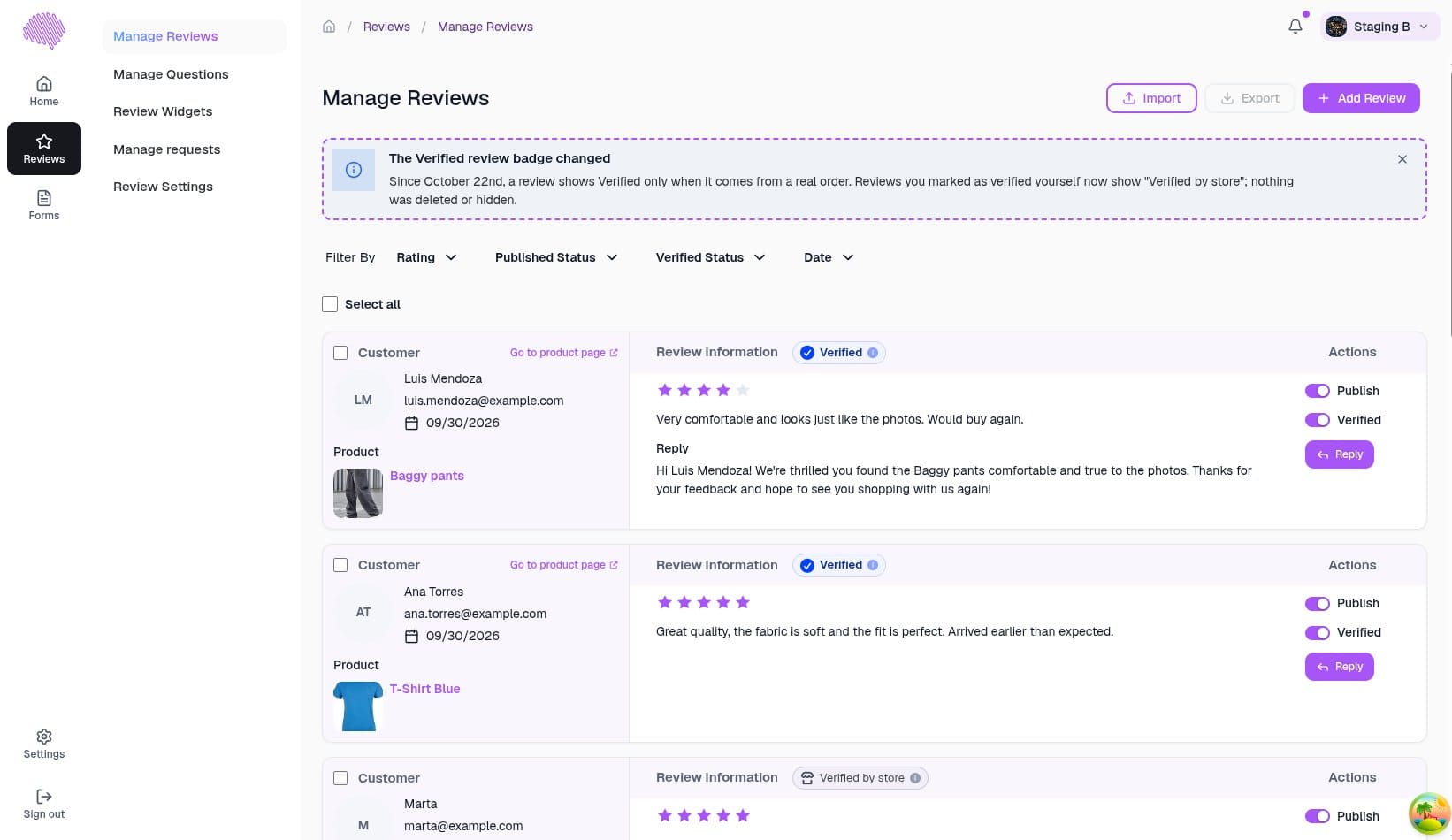
Nothing you’ve collected goes away. Reviews that you had already marked as verified manually, and that aren’t linked to an order, now show a “Verified by store” label instead of “Verified Buyer”. They stay published, they keep their ratings, and they still count toward your average.
The label is intentionally distinct from the Verified Buyer badge: it tells shoppers that you — not EchoBrain — vouch for that customer.
In Manage Reviews, every review now shows a status badge (“Verified” or “Verified by store”) so you can see the difference at a glance. You’ll also see a dismissible notice at the top of the list explaining the change.
3. Choose Whether to Show “Verified by Store”
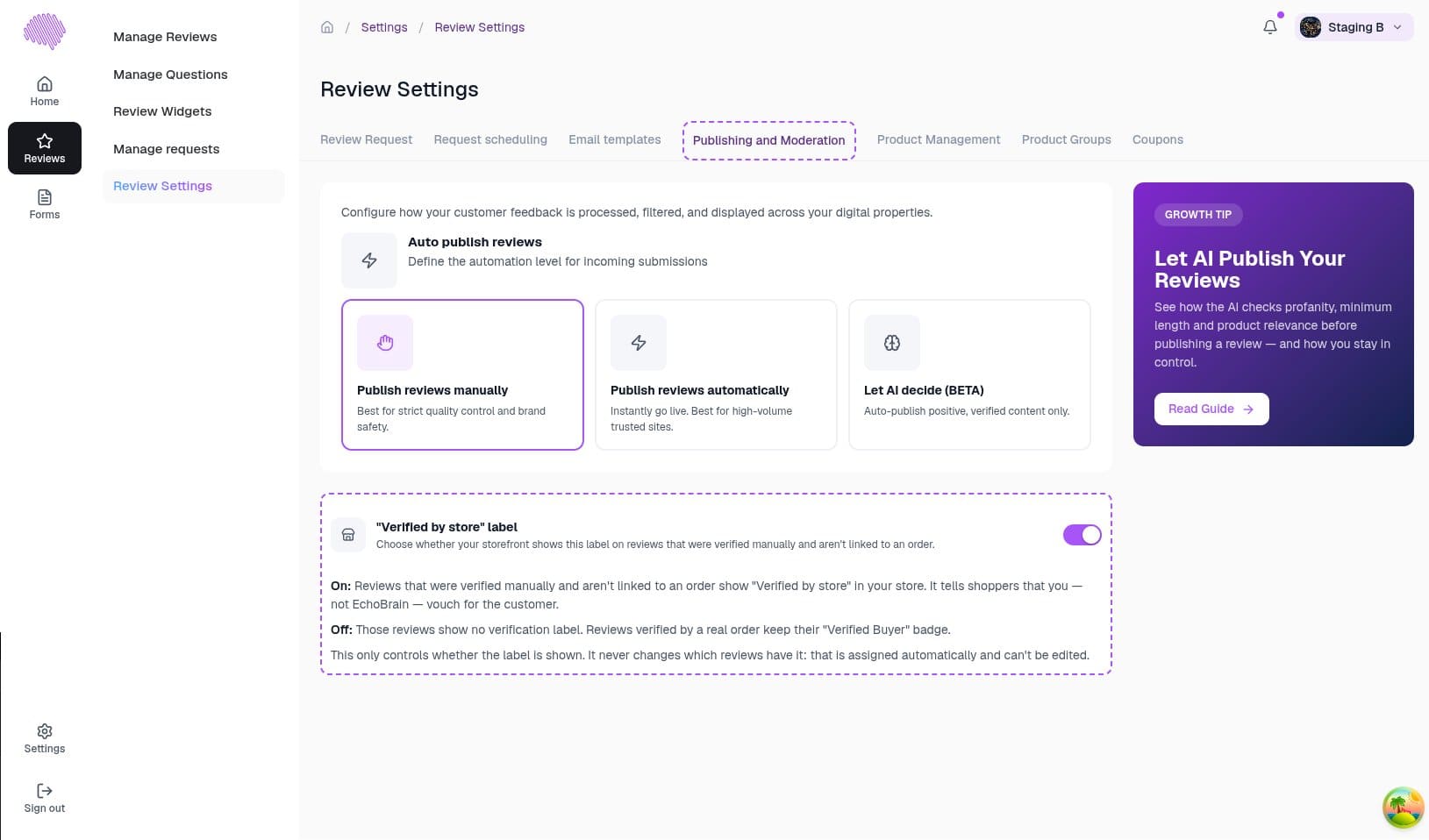
Prefer that your shop only highlights order-verified reviews? Go to Reviews → Review Settings → Publishing and Moderation and use the “Verified by store” label toggle:
- On (default): reviews verified manually in the past show “Verified by store” on your shop.
- Off: those reviews show no verification label. Reviews verified by a real order always keep their “Verified Buyer” badge.
The toggle only controls what your shop displays. It never changes which reviews carry the label.
4. How to Collect More Verified Reviews
The more customers who review through the order link, the more “Verified Buyer” badges your shop earns. Here’s how to make that happen:
- Keep review requests on and tune your timing under Reviews → Review Settings — see Collecting reviews.
- Use Pull past orders to send review requests for purchases made before you installed EchoBrain — see Request and pull past orders.
- Offer an automatic coupon in exchange for a review (PRO plan) to boost response rates.
For the full walkthrough of the reviews list, see Managing your reviews.
Why This Matters
A badge that can’t be set by hand is a badge shoppers can rely on. With “Verified Buyer” reserved for real orders, your verified reviews carry more credibility and your social proof converts better — while “Verified by store” keeps your earlier reviews visible and honestly labeled.
Final Thoughts
Your reviews are safe, your history is intact, and your best new reviews now come with a stronger badge. Log in to EchoBrain today to check your reviews list and send your next round of review requests.