Review Requests: Collecting Reviews from Your Customers
Review Requests allow you to invite your customers to leave a review about their purchase in a simple and automated way.
This section explains how Requests work, what each column means, and how to import previous orders into EchoBrain.
1. What Are Review Requests?
A Review Request represents a single email invitation sent to a customer asking them to leave a review for an order.
Each request is created automatically or manually and is responsible for:
- Sending the review email
- Linking the customer to the correct review form
- Tracking the delivery status of the request
Each row in the Requests table represents one review invitation.
2. Understanding the Requests Table
Below is an explanation of each column visible in the Requests section.

Friendly ID
A short, unique identifier generated by EchoBrain.
This ID helps you quickly identify and reference a specific request.
Review Form URL
This is the link included in the email sent to the customer.
When the customer clicks this link:
- They are redirected to a secure review form
- They can rate their purchase
- They can leave written feedback about their experience
Each Review Form URL is unique and ensures the review is correctly associated with the order.
The customer’s email address where the review invitation will be sent.
This is the email collected from the order data or provided manually.
Status
Indicates the current state of the review request:
- Scheduled → The email is queued and will be sent automatically
- Sent → The email was successfully delivered
- Failed → The email could not be delivered
- Skipped → The request will not be scheduled and no email will be sent
- Imported → The order was imported but has not yet been processed
Most requests appear as Scheduled until the email is sent.
Understanding the Skipped status
A request is marked as Skipped when EchoBrain determines it cannot or should not send an email for that order. This can happen in two situations:
-
No sending schedule found for the delivery country — EchoBrain uses country-based timing rules to determine when to send review request emails. If the order’s delivery country does not match any configured timing rule, the request is skipped. You can review and add timing rules in your store settings.
-
Error while scheduling the email — An unexpected error occurred when EchoBrain tried to queue the email for delivery. In this case, the request is also marked as Skipped to prevent it from remaining in a stuck state.
Skipped requests will not be retried automatically. If you believe a request was skipped by mistake, check your timing configuration to ensure the relevant countries are covered.
MKTG (Marketing Indicator)
This column indicates whether the request is allowed to be used for marketing-related communication.
- ✅ Green check → Marketing communication allowed
- ❌ Red cross → Marketing communication not allowed
This setting does not affect the review request itself.
It is used only for compliance and segmentation purposes.
Order Date
The date and time when the original order was created.
This helps you understand:
- How recent the purchase was
- When the customer experience took place
3. Sending Review Requests Automatically
EchoBrain automatically creates review requests when:
- New orders are synced from your store
- Orders are imported into the system
Each eligible order generates its own review request, ensuring:
- One request per order
- Accurate review attribution
- No manual follow-up required
4. Importing Previous Orders (Pull Past Orders)
If you want to collect reviews for older purchases, you can use Pull past orders.
How It Works
When you click Pull past orders:
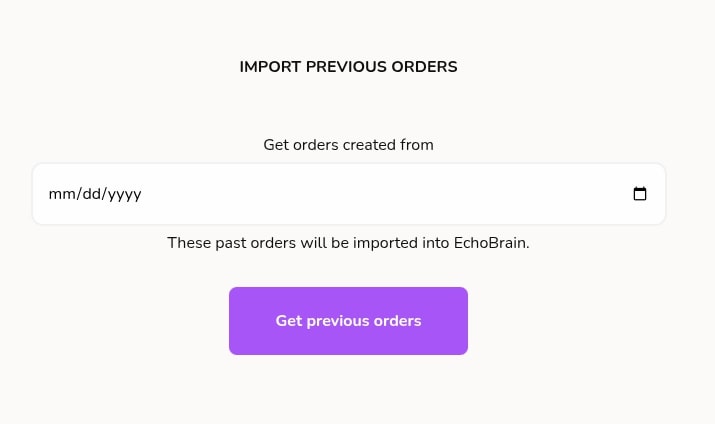
Import previous orders
- Select a starting date
- EchoBrain will fetch all orders created from that date forward
- These past orders will be imported into EchoBrain
- A review request will be created for each imported order
Once imported, these orders behave the same as new ones:
- Review requests are generated
- Emails are scheduled automatically
- Customers receive review invitations
Why Use Pull Past Orders?
This is useful when:
- You are setting up EchoBrain for the first time
- You want to collect reviews from previous customers
- You connected a store with existing order history
It allows you to unlock value from historical orders without manual effort.
5. What the Customer Experiences
From the customer’s perspective, the flow is simple:
- They receive an email asking for a review
- They click the Review Form URL
- They submit a rating and written feedback
- The review appears in your EchoBrain dashboard and widgets (once published)
The review form is mobile-friendly and easy to complete.
6. Why Review Requests Matter
Review Requests help you:
- Increase review collection rates
- Gather verified feedback from real customers
- Automate follow-ups without manual work
- Respect marketing preferences and compliance
- Build trust and social proof for your store
Final Thoughts
Review Requests are the foundation of collecting high-quality customer feedback in EchoBrain.
By combining automatic requests, manual controls, and past order imports, you can turn every purchase — past and future — into valuable customer reviews with minimal effort.